Area of Triangle
Uses
display, buttons
Description
In this challenge you will use your micro:bit to solve the area of the triangle.
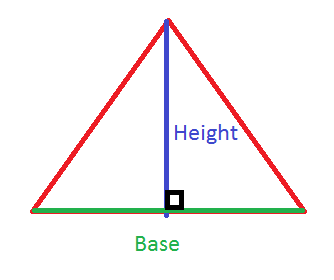
Area of triangle is defined as
\[Area = 0.5 * base * height\]
You can use the buttons of the micro:bit (it’s up to you) to input the values for base and height (e.g. by clicking the button the number will increment, then use the other button to select). Use functions to define area of triangle and when you input values.
Basic Task
- Define formula for area of triangle by creating a function.
2. Create a function to get the input values for base and height. For example you can use button a to increment a number and button b to select that number for base. Repeat again the procedure for height.
3. Call the input function and get the base and height values. Then call the function to get the area of triangle and display the value to the LED.
Extra Task
- Use the same program as above, but this time solving the volume of a right rectangular pyramid.
Hint
\[V = length * width * height / 3\]