Data Structures

Lists
Lists are useful for storing several values together. Let’s say we want to store a player’s scores, we could use a list like the one pictured above. The list has one box for each value. The cells or boxes are known as elelments. The position of an item in a list is its index. Python starts counting from 0, so the first element in a list is at index 0.
Let’s see how to use a list in Python. To create a list we can tell Python the name of the list and what it will contain:
from microbit import *

highScores = [25, 20, 10, 15, 30]       # Create a list and store some values in it.
print(highScores[0])                    # Print 25
print(highScores[3])                    # Print 15
Finding the value of one of the elements in a list is easy as long as you remember that Python counts the elements from ‘0’. In our highScores list above, highScores[0] is 25 and highScores[3] is 15.
You can create an empty list which you can add things to later:
highScores = []
Not surprisingly, Python has some features to help us do things with lists. The code snippet below will go through the array elements one by one so that we can sum them and calculate the average high score.
print("Average High Score: ")

total = 0
for score in highScores:                # For each element ...
        total = total + score

# Use the len() function here to find the length of the array
average = total / len(highScores)
print(average)
Add to a List
There will be times when we don’t know how large to make an array in advance or what the values in the list are going to be. You might want to fill a list with temperature readings or accelerometer values, for example. This code illustrates how you can do that:
from microbit import *

recordedTemperature = []                # Create an empty list
for i in range(100):                    # Add 100 temperature values
        recordedTemperature.append(temperature())
        sleep(1000)
The for loop is executed 100 times and i will have values from 0 to 99. This will measure the temperature every second for 100 seconds and append the value on to the end of the list.
Delete from a List
There are two ways to delete elements from lists that are helpful, you might want to remove an element with a particular value from a list:
highScores.remove(24)
This will remove the first element with the value 24.
Alternatively, you might want to remove an element at a specific position, if you know it:
highScores.pop(3)
This will delete or ‘pop’ the element at the given position in the list. Note that:
highScores.pop()
will delete the last element in the list.
Also, you can delete all the elements from the list by using clear():
letters = ['a', 'b', 'c', 'd']
letters.clear()
Retrieve list element
There are various ways of retrieving the value inside the list.
by index
Elements in lists can be accessed using a numerical index, starting at 0 for the first item. This will scroll ‘zero’ on the display:
numbers = ['zero', 'one', 2]
display.scroll(numbers[0])
by iteration
You can access all the elements of a list in turn, using a ‘for’ loop:
numbers = ['zero', 'one', 2]
for number in numbers:
        display.scroll(number)
by random
Import the random module so you can use random.choice() to retrieve a random element from a list:
import random

hands = ['rock', 'paper', 'scissors']
display.scroll(random.choice(hands))
Change list element
This will replace the item at index 1 (the string ‘one’) with the integer 1:
numbers = ['zero', 'one', 2]
numbers[1] = 1
Sort list
Use sort() to sort lists alphanumerically, or reverse() to reverse the order of the list:
letters = ['c', 'd', 'b', 'a']
letters.sort()
letters.reverse()
This will sort the list into alphabetical order: ‘a’, ‘b’, ‘c’, ‘d’ then will reverse the order of the list to become ‘d’, ‘c’, ‘b’, ‘a’.
You can reverse lists that are made up of different data types, but you can only sort lists alphanumerically that comprise all the same data type, for example all elements must be strings or all integers.
Length of a list
Use len() to find out how long a list is:
numbers = [5, 7, 0, 5]
display.scroll(len(numbers))
This displays 4 because there are 4 elements in the list.
Count occurrences in lists
Use count() to count how many times a particular element occurs in a list:
numbers = [5, 7, 0, 5]
display.scroll(numbers.count(5))
This displays 2 because 5 occurs twice in the list.
Tuples
A tuple is a sequence of immutable Python objects. Tuples are sequences, just like lists. The differences between tuples and lists are, the tuples cannot be changed unlike lists and tuples use parentheses, whereas lists use square brackets.
Creating a tuple is as simple as putting different comma-separated values. Optionally you can put these comma-separated values between parentheses also. For example:
tup1 = ('physics', 'chemistry', 1997, 2000)
tup2 = (1, 2, 3, 4, 5 )
The empty tuple is written as two parentheses containing nothing:
tup = ()
To access values in tuple, use the square brackets for slicing along with the index or indices to obtain value available at that index. For example:
tup1 = ('physics', 'chemistry', 1997, 2000)
tup2 = (1, 2, 3, 4, 5, 6, 7 )
print(tuple1[0])
print(tuple1[1:5])
Once a tuple is created, you cannot change its values. Tuples are unchangeable.:
thistuple = ("apple", "banana", "cherry")
thistuple[1] = "blackcurrant"
# The values will remain the same:
print(thistuple)
Once a tuple is created, you cannot add items to it. Tuples are unchangeable. What you can do is create a new tuple and concatenate the new items.:
thistuple = ("apple", "banana", "cherry")
anothertuple = ("pineapple")
newtuple = thistuple + anothertuple
print(newtuple)
Tuples are unchangeable, so you cannot remove items from it, but you can delete the tuple completely:
thistuple = ("apple", "banana", "cherry")
del thistuple
print(thistuple) #this will raise an error because the tuple no longer exists
Sets
Unlike lists and tuples, sets hold an unordered collection of elements with no duplicates. This makes them suitable for testing membership or removing duplicate elements.
set = {8, 12, 22}

# Add a single element to set
set.add(42)

# Add several elements to set
set.update([16, 32, 64])

# Remove an element from set - throws an error if element not in set
set.remove(42)

# Remove an element if present in set
set.discard(42)
Since a set is an unordered collection of elements, indexing is not possible. Python supports typical set operation methods:
set_a = {1,2,3,4,5}
set_b = {4,5,6,7}
set_c = {1,2}

# Check for membership
2 in set_a

# Return elements in the intersection of set_a and set_b
set_a.intersection(set_b)
# Return true if set_a contains all the elements of set_c
set_a.issuperset(set_c)
An empty set is created using a set() method, as using braces creates an empty dictionary (see below).
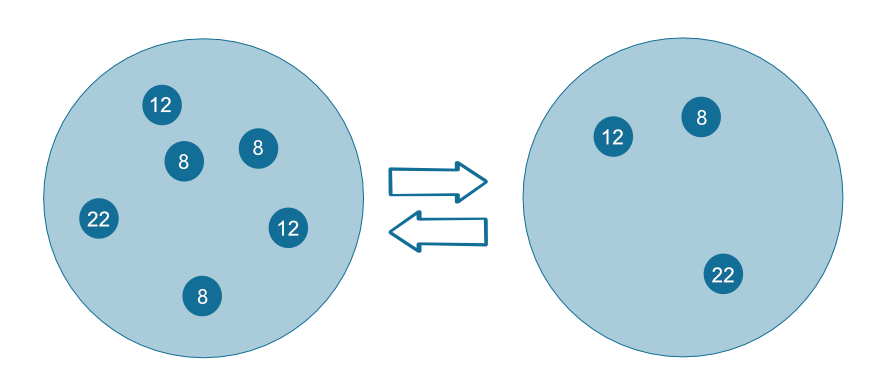
All elements within a set are unique
Dictionaries
Dictionary is an unordered set of key : value pairs. It’s a rule that all keys are unique and have no duplicates. Unlike lists or tuples, which are indexed by numbers,
you can retrieve a value from a dictionary by using the key as an index.
For example, you can store the highscores of all the players:
game_register = { 'googolplex': 100,
                  'terminat0r': 27,
                  'r00t': 150,
                  'dent': 42,
                  'teapot418' : 0 }

# Access elements
game_register['dent']

# Add or update and existing entry
game_register['pepper'] = 50

# Delete an entry
del game_register['pepper']

# Delete all entries
game_register.clear()

# Delete the dictionary
del game_register

# Retrieve a value for the key or default if not in dicionary
game_register.get('dent')
Exercises
- Generate a random number from 0 to 1000 in each loop and store it in a tuple. Print the values on the REPL and use the Plotter function of the mu editor to plot those values.
- Create a list of fruits (apple,bananas,durian,orange,mango). Then arrange them in reverse alphabetical order.
- With the same list as #2, arrange them by word length.
- Write a program to keep record of gestures recognizable by microbit and the number of times they’ve been detected using a dictionary.
- Program microbit to take a compass reading upon press of a button and store the results in a tuple.