Speech
Your micro:bit has a capability to translate text to an audible speech sound. It is a simple speech synthesizer based on a reversed-engineered version from the 1980’s.

Hacking your Headphones (for micro:bit V1)
The simple speech synthesizer of micro:bit can work on simple speakers, but it will work best on headphones because of quality of speech generated. To hack your headphones, you will be needing 2 crocodile clips and your headphones. Below is the illustration:
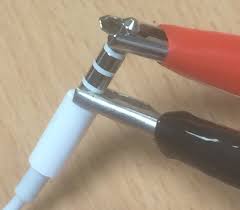
On the micro:bit side, you connect the red wire to pin0 and black wire to pin1. This is what it looks like:
.. image:: speech1.jpg
scale: 80 %
Note
For the new micro:bit V2, there is no need to connect a speaker or headphones to the pins since it has built-in speaker already
Say Something
The simplest way to get the device to speak is to import the speech module and use the say function like this
import speech

speech.say("Hello, World")
The speech synthesiser is quite powerful and can change four parameters:
pitch - how high or low the voice sounds (0 = high, 255 = Barry White) speed - how quickly the device talks (0 = impossible, 255 = bedtime story) mouth - how tight-lipped or overtly enunciating the voice sounds (0 = ventriloquist’s dummy, 255 = Foghorn Leghorn) throat - how relaxed or tense is the tone of voice (0 = falling apart, 255 = totally chilled)
Collectively, these parameters control the quality of sound - a.k.a. the timbre. To be honest, the best way to get the tone of voice you want is to experiment, use your judgement and adjust.
To adjust the settings you pass them in as arguments to the say function.
After some experimentation we’ve worked out this sounds quite Terminator-esque
speech.say("HASTA LA VISTA BABY", speed=120, pitch=100, throat=100, mouth=200)
Poetry on Demand
Being the Terminator they use their robot capabilities to compose poetry and it turns out that the algorithm they use is written in Python like this
# Terminator poetry generator, by John Connor
import speech
import random
from microbit import sleep

# Randomly select fragments to interpolate into the template.
location = random.choice(["manila", "calcutta", "armenia", "malaysia"])
action = random.choice(["wrapped up", "covered", "sang to", "played games with"])
obj = random.choice(["head", "hand", "dog", "foot"])
prop = random.choice(["with vanilla", "with tortilla", "with soda",
                     "with fuschia"])
result = random.choice(["it ran off", "it glowed", "it blew up",
                       "it turned blue"])
attitude = random.choice(["in the park", "like a shark", "for a lark",
                         "with a bark"])
conclusion = random.choice(["where it went", "its intent", "why it went",
                           "what it meant"])

# A template of the poem. The {} are replaced by the named fragments.
poem = [
    "there was a young man from {}".format(location),
    "who {} his {} {}".format(action, obj, prop),
    "one night after dark",
    "{} {}".format(result, attitude),
    "and he never worked out {}".format(conclusion),
    "HASTA LA VISTA BABY",
]

# Loop over each line in the poem and use the speech module to recite it.
for line in poem:
    speech.say(line, speed=120, pitch=100, throat=100, mouth=200)
    sleep(500)
As the comments demonstrate, it’s a very simple in design:
Named fragments (location, prop, attitude etc) are randomly generated from pre-defined lists of possible values. Note the use of random.choice to select a single item from a list. A template of a poem is defined as a list of stanzas with “holes” in them (denoted by {}) into which the named fragments will be put using the format method. Finally, Python loops over each item in the list of filled-in poetry stanzas and uses speech.say with the settings for the Terminator’s voice to recite the poem. A pause of 500 milliseconds is inserted between each line because even Terminators need to take a breath.
Sing a Song of Micro:bit
By changing the pitch setting and calling the sing function it’s possible to make the device sing (although it’s not going to win Eurovision any time soon).
The mapping from pitch numbers to musical notes is shown below:

The sing function must take phonemes and pitch as input like this:
>>> speech.sing("#115DOWWWW")
Notice how the pitch to be sung is prepended to the phoneme with a hash (#). The pitch will remain the same for subsequent phonemes until a new pitch is annotated.
Exercises
- Make another poetry generator, this time change the speed, pitch, throat and mouth parameters.